When you click on links to various merchants on this site and make a purchase, this can result in this site earning a commission. Affiliate programs and affiliations include, but are not limited to, the eBay Partner Network.
Upgrade Your Car Audio Experience!
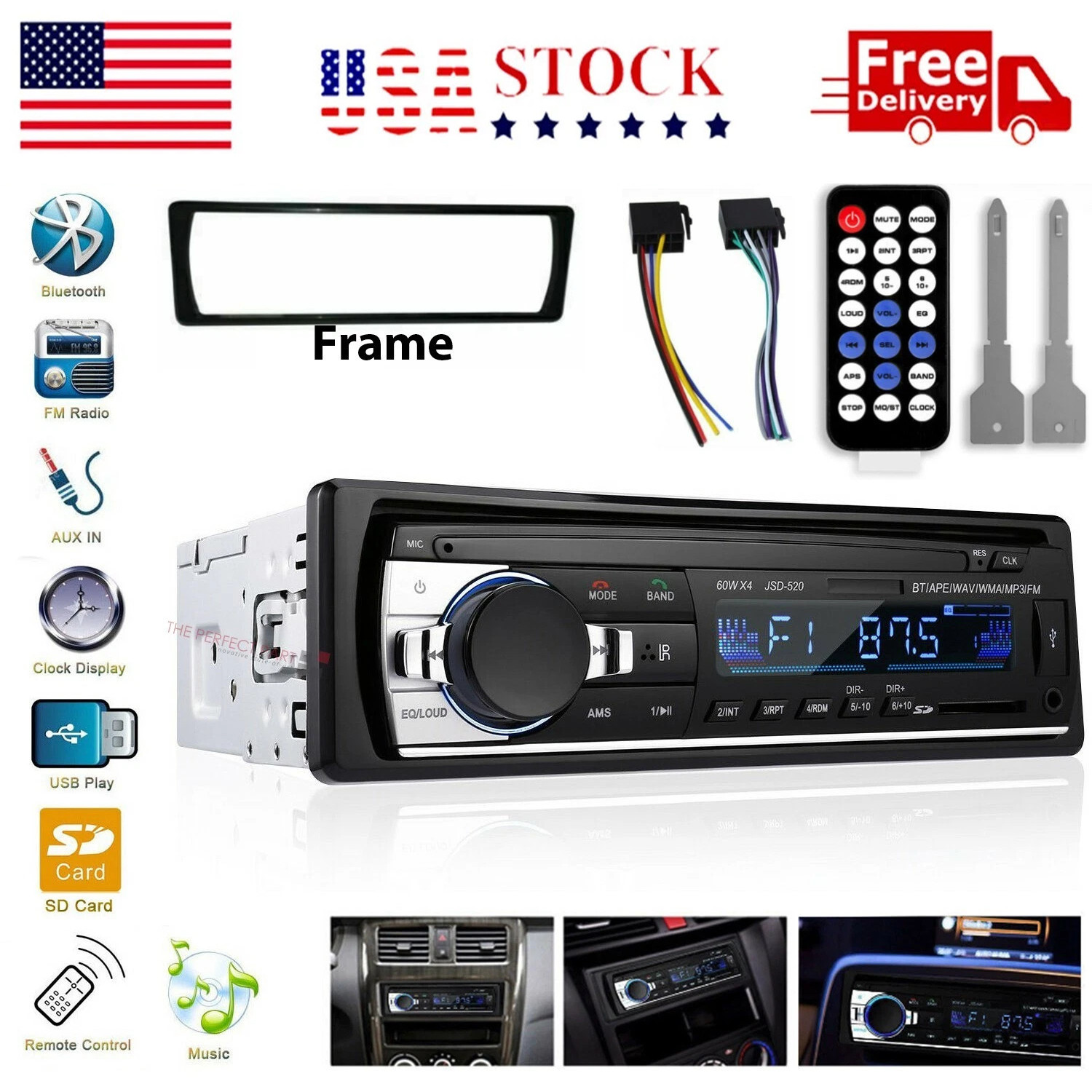
This Head Unit Single DIN Bluetooth car stereo digital systems features a sleek, mech-less design that provide multiple music formats. Delivers powerful sound, and ensures stable Bluetooth connectivity for more enjoyable driving.
User-Friendly Design
- ID3 display screen with soft, non-glaring light makes it easy to read track info day or night.
- Panel Size: 7.4 x 3 x 2.2 Inch(188x77x56mm)
- Installation Dimensions: 7.1 x 2.4 x 2 Inch(180x61x51mm)
- 12V power supply with built-in fuse protection for reliable performance.
What\'s in the box
- Car Stereo Head Unit
- User Manual
- Remote Control
- Dismantling Keys
- Power Cables
Features
Bluetooth Connectivity
Experience smooth and stable wireless pairing. Enjoy hands-free calls and play your favorite music or audiobooks straight from your smartphone while driving.
FM Radio Function
Stay informed with real-time traffic, news, and sports updates. FM range: 87.5~108.0MHz with 18 preset stations and automatic memory for last-used channels.
Dual USB Ports & Fast Charging
Play music directly from your USB drive. Dual USB ports include a 2.1A fast-charging port, keeping your devices powered throughout the journey.
TF Card & AUX Input
Multiple playback options let you enjoy music your way. Supports APE, MP3, WAV, and WMA formats via TF card or AUX input connection.
Dynamic EQ Sound
Fine-tune your favorite audio style with adjustable EQ settings for clear, rich, and immersive sound on every drive.
Remote Convenience
1.Turn the unit ON or OFF
2.MODE: Mode source switch
3.VOL+ : Turn up the volume
4.VOL- : Turn down the volume
5.SEL:Multi-function and audio settings
6. Pause / play button 7-11:FM channel storage
7.Repeat 8.Random 9.Choose ten backwards 10.Preview 11.Previously selected ten
12.MUTE: Pause / play button 13.APS: Radio search 14.EQ:Equalizer control
15.Next 16.Previous 17.BAND: Band switch 18.CLOCK: Time display
19.LOUD: Equal Loudness 20.MO/ST: Mono and Stereo
- Clock Display & Easy Setting
- Easily check the time while driving. Press and hold the CLK button to enter clock mode, then rotate the knob to adjust hours and minutes.
Troubleshooting
Q1.Why the car radio can\'t turn on?
1.Please check the Voltage of car radio:DC 12V
2.When you test this car radio,you can combine the red and yellow wires and connect them to the positive side of the power supply.Black line to negative power supply
3.Replace the same type of insurance to test the car radio
Note:Please msut use our power cables to connect our car radio,it is not possible to insert the original car plug directly into our machine
Q2.Why haven\'t sound in car radio when playing the music?
1.When you are not using our original audio cable, please check if your audio cable is suitable for our car radio
2.Please check if there is any collision between the lines
If the line is connected, there will be no sound when the speaker cable touches the speaker cable.There is also no sound when the power cord touches the speaker cable.
If the problem still here,please use a single speaker to connect a group of audio cables to test the car radio. The four speaker cables are connected separately to see if there is any sound.
Q3.Why can\'t search FM?
1. No radio antenna inserted.
2. Please check if the radio antenna is plugged in. Please insert more antennas several times to make it well contacted
3.The radio antenna on the car is broken/no effect; please replace the radio antenna and test again