When you click on links to various merchants on this site and make a purchase, this can result in this site earning a commission. Affiliate programs and affiliations include, but are not limited to, the eBay Partner Network.
Method 1: Use System Information to find your laptop model
- Step 1: Press\" Windows + R \"to open the Run window.
- Step 2: Type\" msinfo32 \"in the empty box and click\" OK \"to open System Information.
- Step 3: Keep in the \"System Summary \"sectionand you will find the\" System Model \"itemin the right pane.
Method 2: Open the back cover of the laptop and confirm the battery type and capacity, as well as the model of the laptop.
- Step 1: Turn off the laptop and unplug the power cord (to prevent electric shock)
- Step 2: Remove the back panel with a screwdriver. (Please proceed with care to avoid damage to the laptop\'s components.)
- Step 3: Disconnect the cable connected to the battery and remove it. After that, you can check the specifications of your battery.
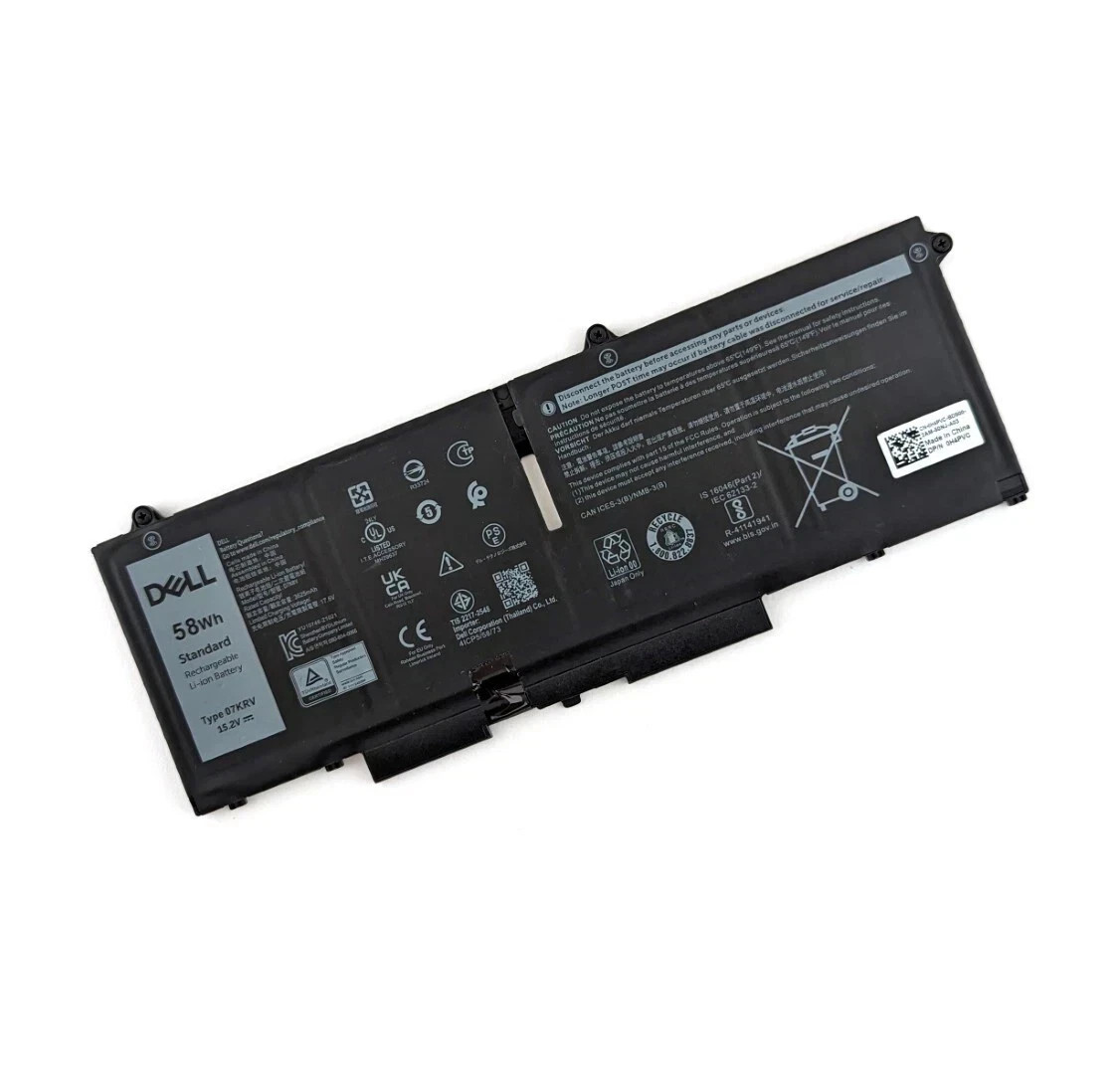
Models:07KRV
Voltage:15.2V
Capacity:58Wh
Battery Type:Li-ion
Battery Condition:Brand New
ØCompatible Part Numbers
07KRV M69D0 H4PVC 0H4PVC Y86WG
(use \"Ctrl+F\" to find your model quickly)
Dell Latitude 5430 5530 Series;
Dell Precision 3570 Series;
Dell P104F P104F005 P104F006 Series;
Dell P137G P137G004 P137G005 P137G006 Series.Z035RZ.
**About 58Wh Type 07KRV 4-Cell Battery Important Notice**
The 07KRV 58Wh 4-Cell & M69D0 41Wh 3-Cell batteries are distinct models, each with its own unique specifications and dimensions. To ensure that you purchase the correct battery for your laptop, we recommend the following steps:
Check Your Original Battery: Open the back cover of your laptop and locate the label on the original battery. Verify the model number printed on it.
Confirm Compatibility: Make sure that the battery model you need is the 07KRV 58Wh 4-Cell. This model is specifically designed to fit and perform optimally with your laptop.
The model and specification of this battery is: 58Wh Type 07KRV 4-Cell Battery
Note: For more accrate, please check the part number of your original battery.
Note:
Please check your battery part number and Laptop Models to ensure you are getting the correct battery for your laptop!
The new battery needs 3-4 cycles of charging and discharging to 5%, and it takes about 7-8 hours to fully activate lithium ions to maximize its space.
Please do not let the battery discharge to the computer to shut down, otherwise it may be damaged easily and may not be charged fully.
If you connect external power to use for a long time, please remove the battery.
If you do not use battery for a long time, make sure to charge more than 80% every month.
If any problems when using our item you can feel free to contact us, we will reply within 24 hours and help you to solve.
ØShipping
Your orders will be shipped out within48 hoursafter your payment is verified(Saturdays & .Sundays are excluded.) .Generally takes3-7Days forUS customer FromNY.We ship via USPS or GOFO Express.
The tracking number will be updated the next business day you pay for it .
ØReturns & Warranty
Your repeat business is important for us, any reason, money back in 60 days and 12 months for warranty and exchange. We are responsible sellers, so please don\'t worry about after-sales service.
PLEASE CONTACT US, we will make it up and solve it more efficiently.
Øresponse
Your better comments will be an encouragement for us to offer the better quality and the better service in future.If you are satisfied with our service or product ,could you please leave us the 5 star positive response? Thank you so much . If you are not satisfied with them, please contact us first via Ask a Question or viaContact Sellerbefore leave a response . Your messages will be answered within24 hours. We shall try our best to solve your problem to your satisfaction.