When you click on links to various merchants on this site and make a purchase, this can result in this site earning a commission. Affiliate programs and affiliations include, but are not limited to, the eBay Partner Network.
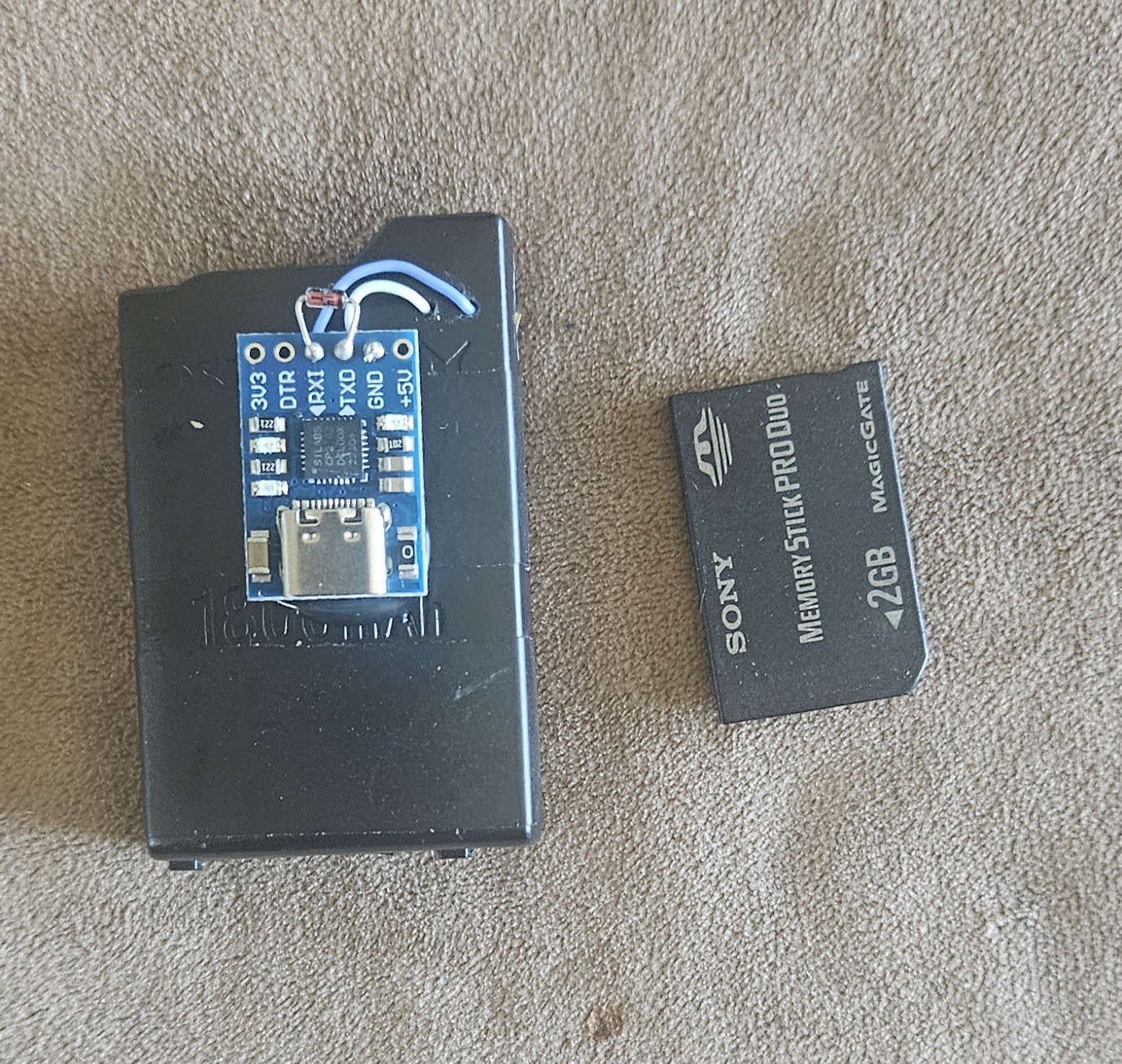
Testedand fully functional PSP Baryon Sweeper Battery Unbrick Tool
Whats Included:
-BayronSweeper Tool designed to beused with the PSP 1000, 2000, and 3000 models
-A pro duo memory card alreadysetup
-Locations of files and informationfor the PSP
The sections below will be required tomake use of this tool when unbricking your PSP 1000, 2000, or 3000 model.
SECTION 1 Python and pysweeper
·Install python.
·download pysweeper and open the pySweeper.pyfile (pySweeper requires Python3 to be properly installed and set up, alongsidethe following pip packages: \"pycryptodome\", \"tk\",\"pyserial\" and \"requests\"
SECTION 2 Using pySweeper and theBaryonSweeper:
·Connect your physical BaryonSweeper to yourcomputer via USB.
·Open the pySweeper.py file
·Make sure that \"Service Mode\" is theselected mode.
·Choose the correct COM Port, e.g. COM4 (the onethat pySweeper has detected your BaryonSweeper on. Open your device manager todetermine which port it is on)
·Press \"Start Service\", pySweepershould now be sending FFFFFFFF to the BaryonSweeper
Note that the PSP should be powered completely off for thefollowing steps.
·Connect external power to your PS (This will maintain power when service mode isstarted\\*).
·Plug the other end of the BaryonSweeper intoyour PSP
·If the PSP does not automatically turn on, usethe power switch to manually turn it on.
If done properly, the BaryonSweeper should now show somecrypto stuff in its Protocol Monitor box. Then the PSP should automaticallyturn on and boot into Aiseirigh! Congratulations! Once Aiseirigh has booted,you can disconnect the BaryonSweeper from your PSP.
·Press \'X’ to install the 6.61 firmware
·You can press L trigger to toggle betweensimplified and advanced mode before and during the installation, use whicheverone you like best :)
·Once the installation is done, simply press X toturn off the PSP.
·If the PSP does not automatically reboot, usethe power switch to boot manually.
Thats it, your PSP should now be running firmware 6.61 andbe fully unbricked, if it previously happened to be fully bricked.
Thanks for looking and if you have any questions don’thesitate to ask.


![[Excellent] Sony PSP-3000 Console Region Free -Select- Color & Bundle picture](/store/img/g/v-8AAeSwEclpB4Gg/s-l225/-Excellent-Sony-PSP-3000-Console-Region-Free-Selec.jpg)